This video should help.
Saturday, April 4, 2009
Getting Started Video
We keep being asked about what to do once you have signed up for Cap Dat ACORD.
This video should help.
This video should help.


Sunday, March 22, 2009
What is Your Relationship With Others
In your work life you have a lot of different relationships with people. Some folks are co-workers, some are clients, some are prospects, some underwriters - you get the idea.
At Cap Dat ACORD we believe you are a real person working with real people and our software service should work exactly that way. Our service should help you have stronger and better relationships instead of isolating you to a computer screen and a cubicle.
So we have added a relationship field for you as a part of the People Profile you create for each person you work with.
You can enter anything you want into the field. Then you can use this to search for groups, etc.
We know you will find ways to use this tool we have not thought of. That is our definition of a good service. You teach it how to work for you instead of you having to learn how to work for it.
Here is a short video showing you how to use the relationship field in Cap Dat ACORD.
At Cap Dat ACORD we believe you are a real person working with real people and our software service should work exactly that way. Our service should help you have stronger and better relationships instead of isolating you to a computer screen and a cubicle.
So we have added a relationship field for you as a part of the People Profile you create for each person you work with.
You can enter anything you want into the field. Then you can use this to search for groups, etc.
We know you will find ways to use this tool we have not thought of. That is our definition of a good service. You teach it how to work for you instead of you having to learn how to work for it.
Here is a short video showing you how to use the relationship field in Cap Dat ACORD.
Find the People You Need to Work With
I am late getting this video out showing you the new People look up carousel in Cap Dat ACORD.
We know you actually are a real person working with other real people. We thought it would be nice if you could see them this way when you worked with them on your computer. What a novel idea.
Here is a quick video - 1 minute and 30 seconds - showing how it works.
You get to find people by actually recognising them. Then we give you more information faster just under the picture. You can even use it just like a Rolodex.
And the people you work with are not all clients. See our video on how to use relationships in Cap Dat ACORD to work with ALL the PEOPLE you actually work with.
We know you actually are a real person working with other real people. We thought it would be nice if you could see them this way when you worked with them on your computer. What a novel idea.
Here is a quick video - 1 minute and 30 seconds - showing how it works.
You get to find people by actually recognising them. Then we give you more information faster just under the picture. You can even use it just like a Rolodex.
And the people you work with are not all clients. See our video on how to use relationships in Cap Dat ACORD to work with ALL the PEOPLE you actually work with.
Add Widgets to Your Policy Files
We are making it possible for you to add widgets - also known as gadgets - to your policy file carousel.
I have embedded the above video using a widget from YouTube.
You may ask why. Or you may ask what is a widget.
Both good and fair questions.
Widgets are programs and services that other people or companies create which you may find useful. The first example I use is always YouTube and the ability to embed a YouTube video into a web page or document.
This is an example below...
I have embedded the above video using a widget from YouTube.
Watch the video to see how we are letting you use this technology in Cap Dat ACORD.
Soon we will be adding this same function to your profile page. I think you will find that a much more useful place to add many widgets. More on that later.
For now realize that what we are doing is opening up our system to work with an incredible range of services available to you online.
Sunday, February 15, 2009
Sneak Peek at Carousels Release
Here is a pre-release look at the new carousel feature we will be releasing later this week.
Monday, February 9, 2009
New Release - Associate Files with Policy Profiles
Announcing Cap Dat ACORD's new Associate File feature.
There are two giant steps forward in this release - plus we have done these things while maintaining our core philosophy of creating a system that learns from you.
And, of course, you can continue to use tags, descriptions and notes to create your own unique information organization.
Our original Cap-Dat ACORD philosophy is to provide you - the user of the system - with as much flexibility as possible. We let you create your own folder tree. We let you self organize your files through tagging, etc.
This release marks a milestone in our also providing you with a more structured framework in which to work. But it does not leave behind your freedoms you have come to expect in Workspace.
To re-inforce that point, everytime you create a form using Profiles, you save it not only in the Policy Profile, you also save it in the Workspace Folder of your choice. Or you can create a new folder in Workspace as you create new Client Profiles, new Policy Profiles, new completed forms, or new uploaded files.
Without getting at all technical about this I do want you to know that the original design foundation of Cap-Dat ACORD is what is allowing it to continue to evolve. We will never change that because we know your needs and expectations will continue to evolve.
There are two giant steps forward in this release - plus we have done these things while maintaining our core philosophy of creating a system that learns from you.
- You can now make Client and Policy Profiles the place you do all of you work in Cap-Dat ACORD. Create new completed forms, upload files into document management, email files, etc.
- You can Associate any file you have already created or uploaded with any Policy Profile.
And, of course, you can continue to use tags, descriptions and notes to create your own unique information organization.
Our original Cap-Dat ACORD philosophy is to provide you - the user of the system - with as much flexibility as possible. We let you create your own folder tree. We let you self organize your files through tagging, etc.
This release marks a milestone in our also providing you with a more structured framework in which to work. But it does not leave behind your freedoms you have come to expect in Workspace.
To re-inforce that point, everytime you create a form using Profiles, you save it not only in the Policy Profile, you also save it in the Workspace Folder of your choice. Or you can create a new folder in Workspace as you create new Client Profiles, new Policy Profiles, new completed forms, or new uploaded files.
Without getting at all technical about this I do want you to know that the original design foundation of Cap-Dat ACORD is what is allowing it to continue to evolve. We will never change that because we know your needs and expectations will continue to evolve.
Select and Edit Policy Profile
Our release on Friday Feb 6th made a change in screens leading to the "Edit Policy Profile" function.
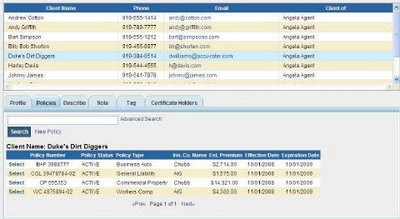
The new release changed the word to the right of the policy from"edit" to "select" as shown below. This is because you can now do so many more things from the policy profile.
When you select the policy you are going to work on, this is the screen which opens now...
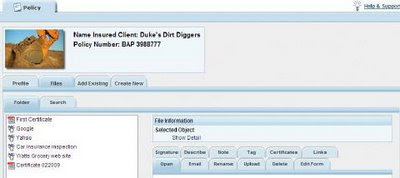
This opens to the new "Files" tab as opposed to the Profile tab.
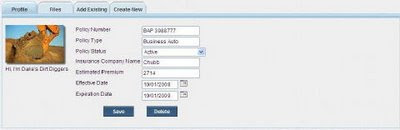
To edit you Policy Profile just click on the Profile Tab and this familiar screen appears...
I hope this has not caused too much confusion.
Duke
The new release changed the word to the right of the policy from"edit" to "select" as shown below. This is because you can now do so many more things from the policy profile.

When you select the policy you are going to work on, this is the screen which opens now...

This opens to the new "Files" tab as opposed to the Profile tab.
To edit you Policy Profile just click on the Profile Tab and this familiar screen appears...

I hope this has not caused too much confusion.
Duke
Subscribe to:
Posts (Atom)